 |

17 Jan 2012
|
|
Registered Users
HUBB regular
|
|
Join Date: Mar 2009
Location: Southampton
Posts: 24
|
|
|
Digital maps.
Currently I am in Costa Rica, heading for South America. I hoped to find maps along the way, but have struggled to do so. I have scanned the forum, and have a basic understanding of what is available. Laugh out loud you may,I have a computer with Mapsource and a Garmin GPS MAP 60 CSX. I am simply at the moment using the GPS as a compass, and using paper maps. It works for me, a computer light weight. I have downloaded maps from Open Street Maps site, but Mapsource will not open the file, I also downloaded a Smelly Biker sample map that I could not open, but since downloading OSM, Mapsource will now open the Smelly Biker sample map, but nothing else. I would be happy just to have a map that I can save to the computer and use offline if that is possible. Is there any simple way or any suggestion that the enlightened out there may have, once the laughter has ceased !!
Thanks. Andy.
|
18 Jan 2012
|
 |
-
Veteran HUBBer
|
|
Join Date: Apr 2006
Location: WWW
Posts: 2,341
|
|
M&S
easiest way is to:
select the maps you want on OSM site and send request.
First email confirms receipt of request.
Once you get second email confirming maps ready download BOTH the .exe one to install in Mapsource AND the .img one.
Copy the gmapsupp.img to a micro SD card and place in CSX
That's it
You can only have one gmapsupp map with that name.
The 62S is the model that can handle multiple maps..
forgot to mention- you will need to zoom in a lot before you see detail.
Last edited by Bertrand; 18 Jan 2012 at 22:28.
|
18 Jan 2012
|
|
Registered Users
Veteran HUBBer
|
|
Join Date: Jan 2008
Location: St Louis, MO
Posts: 124
|
|
The 60csx can only use one "img" file at a time and it has to be called gmapsupp.img. You can store others on the SD card and change the .img file name to something more descriptive. But to use them you'll have to change the name back to gmapsupp.
60csx Tips and Tricks: Best 60CSX Tips—Top Tricks for Garmin GPSMAP 60CSX—Top Ten GPS Resources
daryl
|
18 Jan 2012
|
|
-
Veteran HUBBer
|
|
Join Date: Apr 2006
Location: WWW
Posts: 2,341
|
|
Sorry, I previously had a csx but now using 62S so yes, you can only use one gmapsupp file.
|
19 Jan 2012
|
|
Registered Users
Veteran HUBBer
|
|
Join Date: Jan 2008
Location: St Louis, MO
Posts: 124
|
|
Quote:
Originally Posted by Bertrand

Sorry, I previously had a csx but now using 62S so yes, you can only use one gmapsupp file.
|
Never had a 60csx, but I did replace my Delorme PN40 with a 62s.
daryl
|
19 Jan 2012
|
|
-
Veteran HUBBer
|
|
Join Date: Apr 2006
Location: WWW
Posts: 2,341
|
|
|
Daryl, if you have a 62S then you can name the maps what you want avoiding funny characters. This makes life easier when you come to 'enable' or 'disable' some.
There is still only one gmapprom in the uni'ts own main memory but the micro sd can hold many renamed gmapsupp files.
|
19 Jan 2012
|
|
Registered Users
Veteran HUBBer
|
|
Join Date: Jan 2008
Location: St Louis, MO
Posts: 124
|
|
Quote:
Originally Posted by Bertrand
Daryl, if you have a 62S then you can name the maps what you want avoiding funny characters. This makes life easier when you come to 'enable' or 'disable' some.
There is still only one gmapprom in the uni'ts own main memory but the micro sd can hold many renamed gmapsupp files.
|
I installed a 8g SD in mine and use it as a USB drive, storing manuals, OSM maps, my working gps files and some pictures. With Garmin Basecamp installed on two desktops and a netbook, this allows be to move between different computers as needed.
Its a great unit which suits my needs.
daryl
|
19 Jan 2012
|
|
-
Veteran HUBBer
|
|
Join Date: Apr 2006
Location: WWW
Posts: 2,341
|
|
|
Daryl- can I ask which 8GB (make?) and class Micro SD you are using? I am wondering if the faster cards actually make map scroll speed faster? any ideas? or are the higher class ones just for more speed accessing/writing data between pc and card?
|
19 Jan 2012
|
|
Registered Users
HUBB regular
|
|
Join Date: Mar 2009
Location: Southampton
Posts: 24
|
|
|
Thanks.
Thanks for the info, the link to to the Garmin issues most interesting. However, I have downloaded the Smelly Biker S. American map, but for some reason when loaded Mapsource only shows the top quarter of the continent, and the rest is just tiles. I can zoom in on what I have, but the map only show a few place names and nothing more.Sometimes Mapsource will crash and not respond. The escape key gets me out eventually. I un installed the original download, hoping a reinstall would resolve the problem, but not so. I also un installed other programs from Open Street map, thinking that there may be a problem there, but not so.
I am running a genuine Mapsource program, and I have installed a genuine European City Navigator that works perfectly, but once the Smelly Biker map is installed it seems to screw up every thing, but not every time. The only solution is to close and restart Mapsource.
Any thoughts would brighten my day. Regards. Andy.
|
19 Jan 2012
|
|
Registered Users
Veteran HUBBer
|
|
Join Date: Jan 2008
Location: St Louis, MO
Posts: 124
|
|
Quote:
Originally Posted by Bertrand
Daryl- can I ask which 8GB (make?) and class Micro SD you are using? I am wondering if the faster cards actually make map scroll speed faster? any ideas? or are the higher class ones just for more speed accessing/writing data between pc and card?
|
Good question!
I didn't have time to read though this link, maybe it might help answer your question: http://forums.groundspeak.com/GC/ind...owtopic=256727
I'm using:
ScanDisk 8GB
HC
Class 4
daryl
|
19 Jan 2012
|
|
Registered Users
Veteran HUBBer
|
|
Join Date: Jan 2008
Location: St Louis, MO
Posts: 124
|
|
Quote:
Originally Posted by mudandsmoke
Thanks for the info, the link to to the Garmin issues most interesting. However, I have downloaded the Smelly Biker S. American map, but for some reason when loaded Mapsource only shows the top quarter of the continent, and the rest is just tiles. I can zoom in on what I have, but the map only show a few place names and nothing more.Sometimes Mapsource will crash and not respond. The escape key gets me out eventually. I un installed the original download, hoping a reinstall would resolve the problem, but not so. I also un installed other programs from Open Street map, thinking that there may be a problem there, but not so.
I am running a genuine Mapsource program, and I have installed a genuine European City Navigator that works perfectly, but once the Smelly Biker map is installed it seems to screw up every thing, but not every time. The only solution is to close and restart Mapsource.
Any thoughts would brighten my day. Regards. Andy.
|
Not sure what to recommend.
Could the 'Map Level Detail' be set to 'Lowest'?
Could the 'View' be set to 'Basic Map Only'?
I'm not as familiar with Mapsource as I am with Basecamp.
daryl
Last edited by dlh62c; 20 Jan 2012 at 12:06.
|
20 Jan 2012
|
|
-
Veteran HUBBer
|
|
Join Date: Apr 2006
Location: WWW
Posts: 2,341
|
|
Quote:
Originally Posted by dlh62c
|
Hi Daryl
Tks for the link- Hmmmm...
A rainbow of opinions there so I asked Garmin .
Their take is that speed difference between the class 4,6 etc would be so minute as far as using it in the 62S, that the benefit would not be noticeable.
I had the same response when I asked a few months ago about the Montana 600.
They recommend using a normal one
So I am guessing your using a class4 is probably a good choice.  nothing wrong with a little margin!
Thanks
|
|
Currently Active Users Viewing This Thread: 1 (0 Registered Users and/or Members and 1 guests)
|
|
|
 Posting Rules
|
You may not post new threads
You may not post replies
You may not post attachments
You may not edit your posts
HTML code is Off
|
|
|
|

Check the RAW segments; Grant, your HU host is on every month!
Episodes below to listen to while you, err, pretend to do something or other...
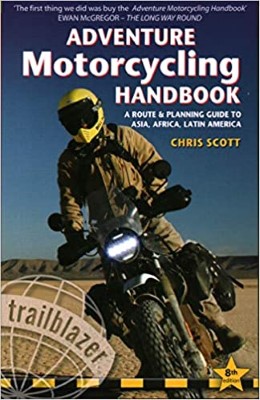
2020 Edition of Chris Scott's Adventure Motorcycling Handbook.
"Ultimate global guide for red-blooded bikers planning overseas exploration. Covers choice & preparation of best bike, shipping overseas, baggage design, riding techniques, travel health, visas, documentation, safety and useful addresses." Recommended. (Grant)

Ripcord Rescue Travel Insurance™ combines into a single integrated program the best evacuation and rescue with the premier travel insurance coverages designed for adventurers.
Led by special operations veterans, Stanford Medicine affiliated physicians, paramedics and other travel experts, Ripcord is perfect for adventure seekers, climbers, skiers, sports enthusiasts, hunters, international travelers, humanitarian efforts, expeditions and more.
Ripcord travel protection is now available for ALL nationalities, and travel is covered on motorcycles of all sizes!
What others say about HU...
"This site is the BIBLE for international bike travelers." Greg, Australia
"Thank you! The web site, The travels, The insight, The inspiration, Everything, just thanks." Colin, UK
"My friend and I are planning a trip from Singapore to England... We found (the HU) site invaluable as an aid to planning and have based a lot of our purchases (bikes, riding gear, etc.) on what we have learned from this site." Phil, Australia
"I for one always had an adventurous spirit, but you and Susan lit the fire for my trip and I'll be forever grateful for what you two do to inspire others to just do it." Brent, USA
"Your website is a mecca of valuable information and the (video) series is informative, entertaining, and inspiring!" Jennifer, Canada
"Your worldwide organisation and events are the Go To places to for all serious touring and aspiring touring bikers." Trevor, South Africa
"This is the answer to all my questions." Haydn, Australia
"Keep going the excellent work you are doing for Horizons Unlimited - I love it!" Thomas, Germany
Lots more comments here!

Diaries of a compulsive traveller
by Graham Field
Book, eBook, Audiobook
"A compelling, honest, inspiring and entertaining writing style with a built-in feel-good factor" Get them NOW from the authors' website and Amazon.com, Amazon.ca, Amazon.co.uk.
Back Road Map Books and Backroad GPS Maps for all of Canada - a must have!
New to Horizons Unlimited?
New to motorcycle travelling? New to the HU site? Confused? Too many options? It's really very simple - just 4 easy steps!
Horizons Unlimited was founded in 1997 by Grant and Susan Johnson following their journey around the world on a BMW R80G/S.
 Read more about Grant & Susan's story
Membership - help keep us going!
Horizons Unlimited is not a big multi-national company, just two people who love motorcycle travel and have grown what started as a hobby in 1997 into a full time job (usually 8-10 hours per day and 7 days a week) and a labour of love. To keep it going and a roof over our heads, we run events all over the world with the help of volunteers; we sell inspirational and informative DVDs; we have a few selected advertisers; and we make a small amount from memberships.
You don't have to be a Member to come to an HU meeting, access the website, or ask questions on the HUBB. What you get for your membership contribution is our sincere gratitude, good karma and knowing that you're helping to keep the motorcycle travel dream alive. Contributing Members and Gold Members do get additional features on the HUBB. Here's a list of all the Member benefits on the HUBB.
|
|
|







 Linear Mode


