 6Likes 6Likes
 |
|

29 Oct 2011
|
|
Gold Member
Veteran HUBBer
|
|
Join Date: Jan 2002
Location: Toronto, Canada
Posts: 2,125
|
|
After reading all the posts here, it seems to me that participants in this discussion are seeking one of two different results:
1) The ability to leave a breadcrumb trail so that others can determine where you are, or;
2) The ability to send a distress message to others.
I think that there are much less expensive options available to fulfill either of the two objectives than dedicated systems such as SPOT and EPIRBs.
In my 'day job', I deliver new aircraft from the factory to the customer. The factory is on Vancouver Island in Canada, the customer is almost always on the other side of the world (Maldives, Seychelles, South America, Tahiti, Papua New Guinea, etc. - you get the idea). The aircraft are always equipped with an Emergency Locator Transmitter (ELT), which functions the same way that the EPIRBs do, so objective number 2 is looked after - if the aircraft crashes, the ELT activates automatically. But this functionality is reserved for only the most serious of emergencies - a crash, or perhaps a forced landing in a hostile environment.
This notwithstanding, all sorts of people I work with (my employer, the customer, friends along my route, etc.) want to be able to find out where I am at any time during my trip. It can sometimes take 10 days to get the aircraft to the other side of the world. I have quite deliberately dodged requests to "carry a SPOT", etc., simply because it would then become "one more thing" that I have to be concerned about - for example, making sure that the battery is charged, making sure that the thing has a view of the satellite constellation, and so forth.
On a recent moto tour through Eastern Europe (see Notes from a September 2011 ride through Romania, Bulgaria, Turkey, and Greece), I used my motorcycle as a proxy for the aircraft, to enable me to try out different tracking solutions to satisfy goal 1) above. After a lot of experimenting, I came to the conclusion that Google Latitude is the least expensive and least complicated way of leaving a breadcrumb trail behind.
It works like this: You set up a Google mail (gmail) account, then tie that account to the Google Latitude functionality. Both are free. Once you have done that, whenever you log into the Latitude home page using a computer that has a Wi-Fi connection to the internet, a breadcrumb is dropped from your log-in location. Anyone else that you authorize to view your location in Google Latitude will then be able to see where you are. For reasons unknown, connecting your computer to the internet via Ethernet (a cable connection) won't drop a breadcrumb - but connecting by Wi-Fi will.
You can increase the frequency of the breadcrumbs that are dropped by Google Latitude by installing the Latitude application on your mobile phone, and leaving the application running on your mobile phone. The application is available (free) for numerous different types of mobile phones, including Android, Blackberry, and others. If you leave the application running on your phone, and your phone has a GPS receiver and a view of the satellite constellation (fairly easy to facilitate, just leave the phone in your jacket pocket), then the phone will log into Google and drop a breadcrumb as long as it has both GPS reception and a connection to the local mobile phone system. I presume in this case that some data connection charges (from the mobile phone provider) will apply. I don't know how much data this application uses, I have not yet seen the bill from my September trip. In any case, you can easily limit the number of breadcrumbs dropped by simply exiting the Google Latitude application on your phone. If the application is not running, it won't pass any data.
All I really need to do to keep the people following me happy is drop a 'daily breadcrumb' so that they know where I am on any given day. I can do that easily enough by logging into the internet via a Wi-Fi connection once a day. That's not a burden on me because I do that anyway just to fetch my mail and read the news. You can use a public computer (doesn't have to be your own) - just visit the Google Latitude web-page and log into your account to drop the breadcrumb.
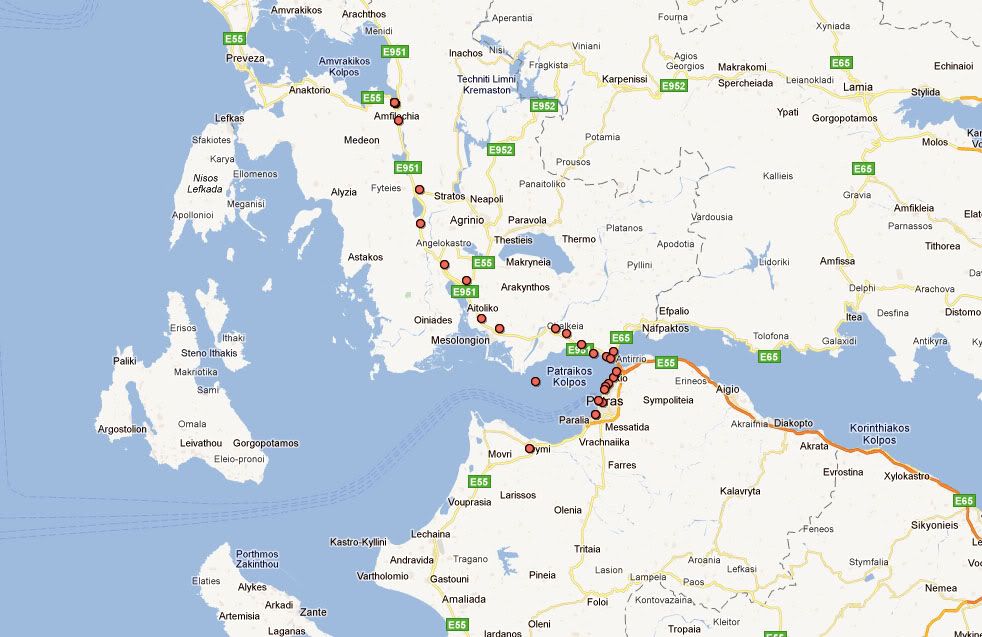
Below is an image showing how the Google Latitude application tracked me riding across Greece about a month ago. I had my phone (Blackberry 9780) in my jacket pocket, and I guess that the GPS satellite signals managed to permeate my riding jacket and get to the phone... so, the phone made a data connection to Google each time I went by a cell tower, and the result is what you see on the map. The breadcrumbs that get dropped are generally pretty accurate - within about 10 meters. Occasionally, one will be slightly in error (see the one in the middle of the water in the picture), but generally, they are pretty accurate.
The only 'disadvantage' to this system is that only you (the Google Latitude account holder) can see the historical map. Everyone else that you authorize to view your location (they can view it on a computer, or on their own mobile device) will only see your most recent location. I don't think that is a problem if the objective is number 1, above... Anyone who goes looking for you will see your most recent location.
As for making contact in an emergency (objective number 2, above) - provided you are in range of a mobile phone network, I think that just dialling someone on your mobile phone and saying "I'm in trouble, and this is where I am" is sufficient. If you have Latitude installed and running on your phone and you are in range of a mobile telephone network, then whomever you call can go to the Latitude website and see where it is that you are calling from, even if you don't know where it is.
I hope this provides some food for thought, and perhaps provides an inexpensive and simple solution for fellow travelers. A key point that must be kept in mind - and that I think might be underestimated by some participants in this discussion - is this: If it is not super-simple and super-easy for you to ensure that your "tracking device" is always broadcasting, then it's not a tracking device, it's just excess weight that you are carrying around.
Michael
Google Latitude Tracking History one afternoon (riding towards the Peloponnese)
|
29 Oct 2011
|
 |
Super Moderator
Veteran HUBBer
|
|
Join Date: Jun 2000
Posts: 4,811
|
|
|
Great tip Micheal - seems OK for regular touring but surely in the world of adventure motorcycling - as least as I see it in deepest Africa, Asia and Latin America - a daily wi-fi signal is a luxury. Or am I out of touch with how widespread wi-fi has become?
I also think there is something to be said for separating one's comms and tracking and nav gadgets - what they call 'redundancy' which I'm sure as a pilot you appreciate.
I also wonder if running a phone on GPS 24/7 eats batteries? I have no use for a smart phone and only turn on my dumb phone to use it, but in my adv travels (not all on bikes) I depend frequently on a sat phone for reliable anywhere/emergency comms, and the SPOT has become useful on remote tours to reassure the group's people back home who may have a different view of 'adventure'. And it seems is fairly dependable at constant tracking too, though that is TMI most of the time.
IMO a Spot is a handy, inexpensive, robust, work-anywhere gadget to back up other devices. A quick jab of the button each night drops a daily breadcrumb and puts people's mind at ease without the need to seek out mobile or wi-fi signals. As an automatic SAR device I believe it has its limits out in the AM world - but then that's why it's an adventure.
Chris
|
29 Oct 2011
|
|
Registered Users
Veteran HUBBer
|
|
Join Date: Jan 2008
Location: St Louis, MO
Posts: 124
|
|
Quote:
Originally Posted by Chris Scott

IMO a Spot is a handy, inexpensive, robust, work-anywhere gadget to back up other devices. A quick jab of the button each night drops a daily breadcrumb and puts people's mind at ease without the need to seek out mobile or wi-fi signals. As an automatic SAR device I believe it has its limits out in the AM world - but then that's why it's an adventure.
Chris
|
Couldn't agree more.
Using the SPOT tracking function and setting up a SPOT shared page, others can follow your progress in near real time. Every 10 minutes a flag will be dropped as you travel your route.
I was following a rider on his trip across Canada, at one point flags kept dropping at one location. Thinking something was amiss, I called his cell. Sure enough, his engine had seized. While he had the situation under control, he was kinda shocked when I called and asked; Whats up!
During a group ride to Red River, New Mexico a good friend had recently had a stroke and couldn't ride along. Using a laptop he could follow us from his hospital bed. His wife said he was glued to that laptop the whole time we were on the road.
On my SPOT contacts page I added my own cell phone number. When I press the OK button, my cell phone rings with a text message to myself. This confirms that my OK message was sent out. The cell phone has rung in as little as 20 seconds after pressing the OK button.
daryl
|
30 Oct 2011
|
|
Gold Member
Veteran HUBBer
|
|
Join Date: Jan 2002
Location: Toronto, Canada
Posts: 2,125
|
|
Quote:
Originally Posted by Chris Scott
...in deepest Africa, Asia and Latin America - a daily wi-fi signal is a luxury. Or am I out of touch with how widespread wi-fi has become?
|
Hi Chris:
I think that Wi-Fi is now more widespread and more easily available on the road than mobile phone services are.
Just about everyone on the planet has some form of internet connection now - even in the most remote places - and if they have hooked it up within the last 3 or 4 years, it's almost a sure bet that they have used Wi-Fi to hook it up, not Ethernet cable.
I get to some pretty far out of the way places when I am delivering the aircraft - certainly more remote and more isolated than when I am riding my motorcycle - and I have yet to visit a place that doesn't have some form of Wi-Fi coverage.
I will admit I am reluctant to use the SPOT simply because it is "yet another gadget to have to worry about". Perhaps I'll try using one on my next ferry flight - maybe that will change my mind.
Michael
|
5 Nov 2011
|
|
Registered Users
HUBB regular
|
|
Join Date: Jan 2009
Posts: 58
|
|
Quote:
Originally Posted by PanEuropean
Hi Chris:
I think that Wi-Fi is now more widespread and more easily available on the road than mobile phone services are.
Just about everyone on the planet has some form of internet connection now - even in the most remote places - and if they have hooked it up within the last 3 or 4 years, it's almost a sure bet that they have used Wi-Fi to hook it up, not Ethernet cable.
I get to some pretty far out of the way places when I am delivering the aircraft - certainly more remote and more isolated than when I am riding my motorcycle - and I have yet to visit a place that doesn't have some form of Wi-Fi coverage.
I will admit I am reluctant to use the SPOT simply because it is "yet another gadget to have to worry about". Perhaps I'll try using one on my next ferry flight - maybe that will change my mind.
Michael
|
I think quite abit of NW tibet has no internet connection.
But then last time I checked spot had no coverage there and in Xinjiang.
Smart phones have to be charged every day and they aren't the most robust device.
|
7 Nov 2011
|
 |
Registered Users
HUBB regular
|
|
Join Date: Jun 2008
Location: China
Posts: 42
|
|
Quote:
Originally Posted by indianarach
Anyone used any GPS tracking devices like SPOT or EPIRB? We are travelling from the UK to South Africa down the eastern route starting next april and thinking of getting a GPS/satellite tracker for emergencies. I wondered if anyone had used one, especially the SPOT system as the coverage map seems to get sketchy south of Ethiopia. Also interested if anyone wants to sell one second hand in the UK (same goes for a 12v fridge too!) Thanks! Rachel
|
We have just ridden our bikes from southern tip of Africa, Arniston to northern tip, Alexandria ... just less than 20,000kms and used Tracks on Africa on our garmin and it was good except for Sudan and Egypt. If you have a PC you can use Tracks on Africa to plan offline. We did see people use SPOT as a safety precaution, but we never met anyone who actually used it. Most like us just used Garmin.
Now we are waiting in Sinai, Egypt to see if we can get Syrian visas. On the subject of GPS we heard they were not allowed in Syria... anyone know if this is true. ??
Our trip and diary is at
www.bigbiketrip.net
Safe and fun travels
Rupert & F  anny
|
19 Dec 2011
|
 |
Registered Users
HUBB regular
|
|
Join Date: Mar 2008
Location: South Africa
Posts: 91
|
|
|
We used SPOT for West Africa - our experience
Hi Folks,
We used a SPOT 2 on our trip down West Africa from Morocco. You can read about it at Latest news / About us - Langebaan Sunset - Stonehenge UK to Cape Town SA - 2010/11 and specifically on our prep page Preparations - Langebaan Sunset - Stonehenge UK to Cape Town SA - 2010/11
Here is our experience:
- We used SPOT linked to Facebook & Twitter. It enabled us to send a message giving location and "OK" message as we did not take a Sat Phone and it serves as a means to summon help if needed.
- We sent a message almost daily once we had stopped for the day
- We rarely used the breadcrumb mode - its power hungry and not really needed if you are sending an OK message daily
- We made our SPOT page "private" when we were in Mauritania (we stayed to southern parts of Mali).
- It worked for the whole of our Europe leg, North Africa, West Africa and Central Africa. It started to become intermittent when we got to North East Namibia. It was intermittent when we crossed East into Zim & Moz and onto SA. This kind of correlates with the SPOT coverage map
- Cant speak for East Africa route
- We did pay for the full insurance for possible rescue if we got lost / injured somewhere very remote (that is why we got it) as we did go off road / went remote in the deserts of Morocco / Namibia and in Central Africa.
- As a system to help if you got kidnapped I doubt the rescue would be effected quickly enough to be effective but you might be able to send a "help" message if you had it pre-programmed (probably unlikely in such a situation). I think if you are buying the device with this in mind I would probably devote time to picking a route that avoids kidnap hot spots which would be your best tactic.
- We found SPOT 2 to be a great way to send updates to friends and family without the need to venture into Internet Cafes (which were few and far between on our route)
- We would probably use GSM phone linked to Twitter next time - smart phones with geo-location effectively do part of what SPOT does now
- We used 2x sets of batteries lasted us the whole trip in the mode we used it for.
Summary
Positives: convenient, robust, compact and a good way to stay in touch, much cheaper than a Sat Phone, allows your trip to be more interactive, way cheaper than EPERB
Negatives: Possible expensive add on if you are on a budget trip, coverage is not 100% for Africa, smart phones can serve as a means to send geo-location based info / comms
HTH
Safe travels
Nick
|
26 Mar 2012
|
|
Gold Member
New on the HUBB
|
|
Join Date: Dec 2007
Location: Berlin, VT USA
Posts: 3
|
|
|
Delorme InReach experience??
This has been a good discussion of the Spot and other tracking options but I'm curious if anyone has used the InReach and what their experience has been. I have read some not so complimentary reviews about how complex the Delorme software is but they have a version that mates with my Android phone that looks interesting. And because they use the Iridium satellite network they have theoretically better covereage than the Spot.
Last edited by Lurch II; 27 Mar 2012 at 01:13.
|
30 Mar 2012
|
|
Registered Users
Veteran HUBBer
|
|
Join Date: Feb 2011
Location: Tasmania
Posts: 102
|
|
|
Hi All
Firstly a great thread and makes very useful reading.
We are about to drive from Scotland to Eastern Russia through Mongolia and a lot of exploring in Eastern Russia by Landrover.
We will be carrying a Sat Ph as we always do.
We looked at the Spot but although the tracking is great for Family and Friends there is no back up in Russia and communication is one way only.
We are going to use a Solara Field Tracker 2100. It works via the Iridium Sat System and guaranteed transmission no matter where you are. You can set your own breadcrumb trail to allow others to track you at an interval that you can define. It will act as a GPS EPIRB. and you can send and receive texts where-ever you are. so in an emergency you can allow others to know the nature of your emergency and you can also be sure your SOS has been received and communicate with your would be rescuers.
It is ruggedised waterproof shock resistant etc
Worth a look I think. Try google. Lots of info
Hope this is useful.
Regards
Callum
|
10 Nov 2013
|
|
Registered Users
New on the HUBB
|
|
Join Date: Nov 2013
Posts: 1
|
|
|
personal GPS tracker
i dont know the brands that u mentioned, but im using something else as a personal gps tracker, and its owsome.
im tracking my alzhiemer dad, and my little girl (9yrs old) on her way fromo school.
i have access from my laptop or my phone.
|
10 Nov 2013
|
|
Registered Users
Veteran HUBBer
|
|
Join Date: Dec 2012
Location: NSW Australia - but never there
Posts: 1,235
|
|
Quote:
Originally Posted by Lurch II
This has been a good discussion of the Spot and other tracking options but I'm curious if anyone has used the InReach and what their experience has been. I have read some not so complimentary reviews about how complex the Delorme software is but they have a version that mates with my Android phone that looks interesting. And because they use the Iridium satellite network they have theoretically better covereage than the Spot.
|
We used a SPOT 2 for nearly a year - in Central America, Iceland and in Argentina and Chile.
Recently started playing up - hard to get turned on and turned itself off whenever it felt like - and while the SPOT service was excellent in that they offered to send a replacement in Santiago, we couldn't hang around for the 2+ weeks that the mail might have taken, so we will do the swap when we get to the US.
In the meantime we bought a Delorm InReach SE and while it is certainly more expensive to buy, the tracking performance is way ahead of that of the SPOT.
For example, in Iceland our tracking map is missing heaps of points among the fiords (on the northern sides) because of the topography and the same in Chile along the coast especially when we were heading south with the SPOT on the dash facing south and I expected it would get much worse once we got further south. With the InReach there is not one tracking point missing from the Spotwalla map since we left Santiago simply because of the two-way communication that verifies reception of each point and each message. If a message doesn't get through, it just stores it until it does get through. Occasionally when under thick forest canopy the display will say "sent 45 out of 48" say, but when checking the map they are all there and in the correct place and for a change, the speed info for each point makes sense.
https://spotwalla.com/tripViewer.php...fillFactor=100 you can see the difference south of Santiago compared with north
Re the software - easy enough to use and probably easier than SPOT. The delorm tracking map retains points indefinitely unlike Spot where they go after a week or so. I use Spotwalla which also stores all data indefinitely plus you can have several trips covering different periods and insert photos on the map. When teamed with a smart phone, the SE has world maps that can be downloaded on to your smart phone or tablet
Last edited by Tony LEE; 10 Nov 2013 at 22:17.
|
10 Nov 2013
|
|
Gold Member
Veteran HUBBer
|
|
Join Date: Sep 2013
Location: Bermuda
Posts: 163
|
|
|
I also have a Delorme Inreach and am happy with it. I used it for a five-week trip around Europe this year as a test for my 2014 trip.
I like the option of having pre-set messages that can be sent via SMS at no cost. I send one at the beginning of each day that says we are setting off for the day and another once that says we've reached our destination for the day. Custom text messages can be created and sent at any time, via satellite, so communication is still possible when there is no cellphone cover.
I have it set on 'track' constantly, so that family members can see where we are at any time. The tracks show up on a web-map that can be restricted by a password.
Very happy with my Delorme. It will be coming on the six-month trip in 2014.
__________________
2014 overland adventure to Russia and Central Asia in Land Rover Defender www.bermudarover.com
|
4 Aug 2017
|
|
Registered Users
Veteran HUBBer
|
|
Join Date: Oct 2016
Location: Devon, UK
Posts: 794
|
|
Bounce of an old thread as I was looking at a fairly recent utility www.polarsteps.com which looks like quite a nice way of reporting progress on a long trip. Of course, like all smartphone apps they depend on getting data connection, potentially expensive if you haven't got wifi and impossible if no signal.
So to my mind a GPS/satcom device of some sort is a smart idea to keep with you for those "oh s***" moments. The technology has moved on since the last post on this thread but personally I favour the SPOT for its small size and lower price despite the holes in coverage, which don't affect the parts of the world I expect to be heading to. Part of my reasoning is the possibility to leave it charging in a discreet location on the bike overnight as an anti-theft tracker then take it out and carry it as a PLB type device during the day. Obviously you can get dedicated anti theft trackers but they tend to work on mobile networks which may not be available where you park up. Anyone else tried this approach?
|
4 Aug 2017
|
|
Super Moderator
Veteran HUBBer
|
|
Join Date: Jun 2000
Posts: 4,811
|
|
|
Sounds like a clever idea - 2 uses from one gadget.
Not sure SPOT has 'holes in coverage' does it? GPS signal is worldwide.
Just massive regional holes in deploying a timely response to an emergency call (last time I checked). For that, a sat phone is always best.
True what you say about mobile-based anti-theft / tracking. Patchy tracking outside of Europe I was told by one user.
|
4 Aug 2017
|
|
Registered Users
Veteran HUBBer
|
|
Join Date: Oct 2016
Location: Devon, UK
Posts: 794
|
|
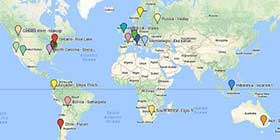
GPS is very widespread as you say, this is more the satcom transmission facility. This is the map they give, orange areas are 96% probability of sending a message in 20 minutes. Yellow is less. So it does depend where you expect to be going.

|
|
Currently Active Users Viewing This Thread: 1 (0 Registered Users and/or Members and 1 guests)
|
|
|
 Posting Rules
|
You may not post new threads
You may not post replies
You may not post attachments
You may not edit your posts
HTML code is Off
|
|
|
|

Check the RAW segments; Grant, your HU host is on every month!
Episodes below to listen to while you, err, pretend to do something or other...

2020 Edition of Chris Scott's Adventure Motorcycling Handbook.
"Ultimate global guide for red-blooded bikers planning overseas exploration. Covers choice & preparation of best bike, shipping overseas, baggage design, riding techniques, travel health, visas, documentation, safety and useful addresses." Recommended. (Grant)

Ripcord Rescue Travel Insurance™ combines into a single integrated program the best evacuation and rescue with the premier travel insurance coverages designed for adventurers.
Led by special operations veterans, Stanford Medicine affiliated physicians, paramedics and other travel experts, Ripcord is perfect for adventure seekers, climbers, skiers, sports enthusiasts, hunters, international travelers, humanitarian efforts, expeditions and more.
Ripcord travel protection is now available for ALL nationalities, and travel is covered on motorcycles of all sizes!
What others say about HU...
"This site is the BIBLE for international bike travelers." Greg, Australia
"Thank you! The web site, The travels, The insight, The inspiration, Everything, just thanks." Colin, UK
"My friend and I are planning a trip from Singapore to England... We found (the HU) site invaluable as an aid to planning and have based a lot of our purchases (bikes, riding gear, etc.) on what we have learned from this site." Phil, Australia
"I for one always had an adventurous spirit, but you and Susan lit the fire for my trip and I'll be forever grateful for what you two do to inspire others to just do it." Brent, USA
"Your website is a mecca of valuable information and the (video) series is informative, entertaining, and inspiring!" Jennifer, Canada
"Your worldwide organisation and events are the Go To places to for all serious touring and aspiring touring bikers." Trevor, South Africa
"This is the answer to all my questions." Haydn, Australia
"Keep going the excellent work you are doing for Horizons Unlimited - I love it!" Thomas, Germany
Lots more comments here!

Diaries of a compulsive traveller
by Graham Field
Book, eBook, Audiobook
"A compelling, honest, inspiring and entertaining writing style with a built-in feel-good factor" Get them NOW from the authors' website and Amazon.com, Amazon.ca, Amazon.co.uk.
Back Road Map Books and Backroad GPS Maps for all of Canada - a must have!
New to Horizons Unlimited?
New to motorcycle travelling? New to the HU site? Confused? Too many options? It's really very simple - just 4 easy steps!
Horizons Unlimited was founded in 1997 by Grant and Susan Johnson following their journey around the world on a BMW R80G/S.
 Read more about Grant & Susan's story
Membership - help keep us going!
Horizons Unlimited is not a big multi-national company, just two people who love motorcycle travel and have grown what started as a hobby in 1997 into a full time job (usually 8-10 hours per day and 7 days a week) and a labour of love. To keep it going and a roof over our heads, we run events all over the world with the help of volunteers; we sell inspirational and informative DVDs; we have a few selected advertisers; and we make a small amount from memberships.
You don't have to be a Member to come to an HU meeting, access the website, or ask questions on the HUBB. What you get for your membership contribution is our sincere gratitude, good karma and knowing that you're helping to keep the motorcycle travel dream alive. Contributing Members and Gold Members do get additional features on the HUBB. Here's a list of all the Member benefits on the HUBB.
|
|
|







 Linear Mode


