 |

20 Jun 2011
|
 |
Registered Users
Veteran HUBBer
|
|
Join Date: May 2006
Location: Austin, TX
Posts: 303
|
|
|
Garmin eTrex H - what's the deal with the data port?
I've bought a simple Garmin eTrex H GPS, no maps just coordinates.
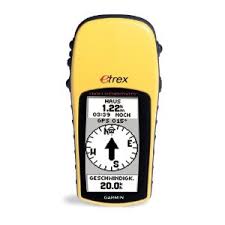
Borrowed one from a friend last year and liked it a lot. He warned me that I couldn't connect it to a computer tho. If that's true I wonder what the data and electric port on the back is for. Cables are very expensive (30-50€ and thus more than half as much as I've paid for the GPS itself) and I can't find anything online or in the manual. Any eTrex H owners around here?
__________________
"Life is not a journey to the grave with the intention of arriving safely in one pretty and well preserved piece, but to skid across the line broadside, thoroughly used up, worn out, leaking oil, shouting GERONIMO!"
|
21 Jun 2011
|
|
Registered Users
Veteran HUBBer
|
|
Join Date: Sep 2007
Location: Cairo
Posts: 304
|
|
I've got one of them. Had it for quite a few years.
I bought a cable from ebay and can connect it to my computer to transfer waypoints. I'm not sure why someone says you can't.
The eTrex is a good little thing and does what it says on the tin. A basic point and shoot GPS that I've had no problems with whatsoever.
This is the cable I bought (but many years ago) -
http://cgi.ebay.de/PC-Data-Interface...item53dd5abec0
|
21 Jun 2011
|
|
Registered Users
Veteran HUBBer
|
|
Join Date: May 2006
Location: Austin, TX
Posts: 303
|
|
Quote:
Originally Posted by onlyMark

|
Whoa what a ripoff! The exact same cable costs 29€ on eBay Germany: USB Datenkabel Datakabel Garmin Etrex H Geko eMap GPS | eBay I'll get one from the US in that case, thanks for pointing that out.
How does the waypoint transfer work? Never having owned a Garmin I'm not at all familiar with the procedure. Do you need a special software? What format do they have to be in? Can it be created from, say, Google Maps / Google Earth? Oh, and one more thing: since it's also described as 'power' in the manual can it actually charge the batteries or just power the device?
__________________
"Life is not a journey to the grave with the intention of arriving safely in one pretty and well preserved piece, but to skid across the line broadside, thoroughly used up, worn out, leaking oil, shouting GERONIMO!"
|
21 Jun 2011
|
|
Registered Users
Veteran HUBBer
|
|
Join Date: Sep 2007
Location: Cairo
Posts: 304
|
|
mj, my cable is different to your example. Yours has a USB end on it, mine is different. It depends, as Ive got an old computer, what connections you have on yours. Though I think it will still have the same one as on my cable. If not, it then depends on an adapter cost. But both are on ebay de as you can see from my link. Don't forget the postage costs though.
However, mine doesn't charge. A USB one might.
I don't tend to use or transfer a lot of waypoints, apart from an important few.
The waypoint files you get off the internet from any one of a number of sources are usually (I think) in a format of GPX and LOC files.
These I transfer if needs be using a piece of free but basic software -
EasyGPS - FREE GPS Software for your Garmin, Magellan, or Lowrance GPS
Help topics here - Getting started with EasyGPS | Free GPS Software | EasyGPS Help File
On Google Earth though, isn't there facility to transfer directly to a GPS? I'll have to check later.
There are many more expert than me at this, I tend to do the bare amount necessary to find where I want to go or record where I've been. I used it often for geocaching, but that was simple enough with just having to input a couple of points.
|
21 Jun 2011
|
|
Registered Users
Veteran HUBBer
|
|
Join Date: May 2006
Location: Austin, TX
Posts: 303
|
|
|
Yes, I've noticed that cable difference, too. Your cable is a serial cable with RS232 connector, mine was an USB cable. Either way I've asked the seller about the cable's power capabilities (apparantly some Garmin USB cables able to power the device while others are not) and it's not capable of doing that. The powered version would cost 45€ - no thanks. I'll be building a RS232 cable myself before I fork out any money for something I may not even need.
I've also stumbled accross EasyGPS. To be honest my GPS experience is rather limited. I've been using Copilot on my Android Smartphone so far but never loaded any waypoints or copied any data from or to the device. I'll be back with additional info once I've managed to build a data cable.
__________________
"Life is not a journey to the grave with the intention of arriving safely in one pretty and well preserved piece, but to skid across the line broadside, thoroughly used up, worn out, leaking oil, shouting GERONIMO!"
|
23 Jun 2011
|
|
Registered Users
Veteran HUBBer
|
|
Join Date: May 2006
Location: Austin, TX
Posts: 303
|
|
It worked!
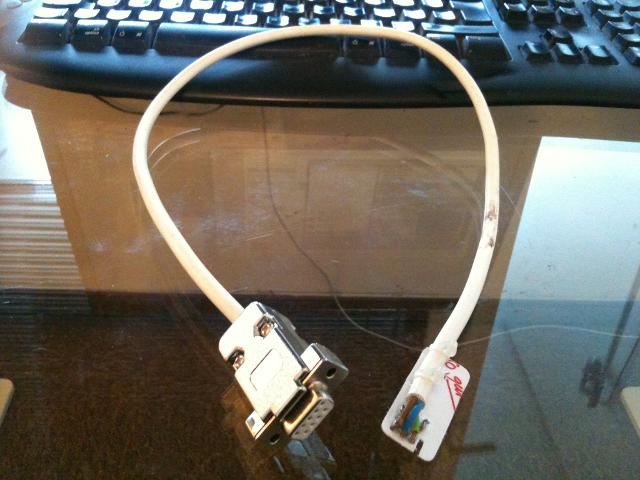
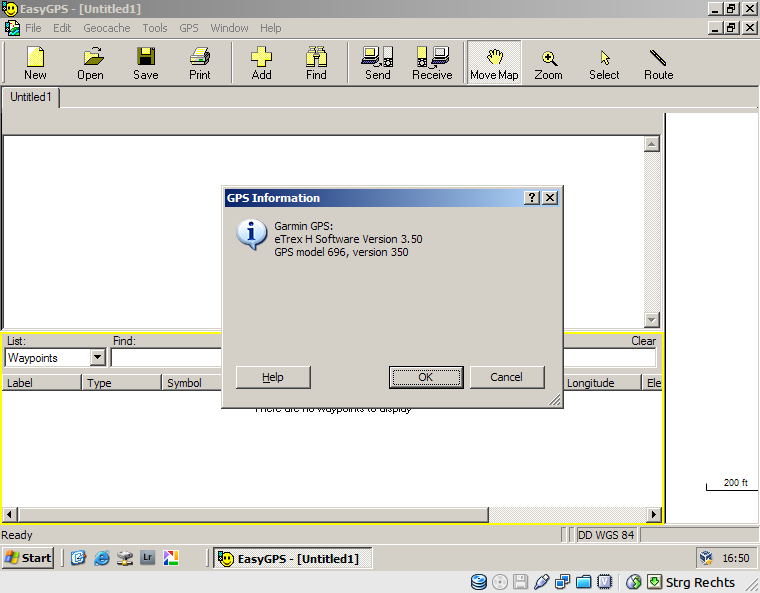
I've successfully transferred waypoints and routes from EasyGPS to the device and back. I can now work with RouteConverter to manage routes and waypoints and upload them to the device with EasyGPS. Costs: ~10ct for the cable (no actual costs of material but had to solder thus 10ct for the tin and electricity) + 5€ for RS232 <-> USB adapter. Take that, Garmin!
__________________
"Life is not a journey to the grave with the intention of arriving safely in one pretty and well preserved piece, but to skid across the line broadside, thoroughly used up, worn out, leaking oil, shouting GERONIMO!"
|
23 Jun 2011
|
|
Registered Users
Veteran HUBBer
|
|
Join Date: Sep 2007
Location: Cairo
Posts: 304
|
|
|
Well done and good luck.
All you have to do now is make a load more and sell them on eBay!
|
2 Aug 2011
|
|
Registered Users
Veteran HUBBer
|
|
Join Date: May 2006
Location: Austin, TX
Posts: 303
|
|
|
Another quick update: using RouteConverter and EasyGPS I've managed to successfully use this device for actual routing. It's pretty smart and even skips a waypoint if I've passed it and am getting closer to the next or previous one. If anyone's interested contact me by PM and I'll gladly help.
__________________
"Life is not a journey to the grave with the intention of arriving safely in one pretty and well preserved piece, but to skid across the line broadside, thoroughly used up, worn out, leaking oil, shouting GERONIMO!"
|
|
Currently Active Users Viewing This Thread: 1 (0 Registered Users and/or Members and 1 guests)
|
|
|
 Posting Rules
|
You may not post new threads
You may not post replies
You may not post attachments
You may not edit your posts
HTML code is Off
|
|
|
|

Check the RAW segments; Grant, your HU host is on every month!
Episodes below to listen to while you, err, pretend to do something or other...

2020 Edition of Chris Scott's Adventure Motorcycling Handbook.
"Ultimate global guide for red-blooded bikers planning overseas exploration. Covers choice & preparation of best bike, shipping overseas, baggage design, riding techniques, travel health, visas, documentation, safety and useful addresses." Recommended. (Grant)

Ripcord Rescue Travel Insurance™ combines into a single integrated program the best evacuation and rescue with the premier travel insurance coverages designed for adventurers.
Led by special operations veterans, Stanford Medicine affiliated physicians, paramedics and other travel experts, Ripcord is perfect for adventure seekers, climbers, skiers, sports enthusiasts, hunters, international travelers, humanitarian efforts, expeditions and more.
Ripcord travel protection is now available for ALL nationalities, and travel is covered on motorcycles of all sizes!
What others say about HU...
"This site is the BIBLE for international bike travelers." Greg, Australia
"Thank you! The web site, The travels, The insight, The inspiration, Everything, just thanks." Colin, UK
"My friend and I are planning a trip from Singapore to England... We found (the HU) site invaluable as an aid to planning and have based a lot of our purchases (bikes, riding gear, etc.) on what we have learned from this site." Phil, Australia
"I for one always had an adventurous spirit, but you and Susan lit the fire for my trip and I'll be forever grateful for what you two do to inspire others to just do it." Brent, USA
"Your website is a mecca of valuable information and the (video) series is informative, entertaining, and inspiring!" Jennifer, Canada
"Your worldwide organisation and events are the Go To places to for all serious touring and aspiring touring bikers." Trevor, South Africa
"This is the answer to all my questions." Haydn, Australia
"Keep going the excellent work you are doing for Horizons Unlimited - I love it!" Thomas, Germany
Lots more comments here!

Diaries of a compulsive traveller
by Graham Field
Book, eBook, Audiobook
"A compelling, honest, inspiring and entertaining writing style with a built-in feel-good factor" Get them NOW from the authors' website and Amazon.com, Amazon.ca, Amazon.co.uk.
Back Road Map Books and Backroad GPS Maps for all of Canada - a must have!
New to Horizons Unlimited?
New to motorcycle travelling? New to the HU site? Confused? Too many options? It's really very simple - just 4 easy steps!
Horizons Unlimited was founded in 1997 by Grant and Susan Johnson following their journey around the world on a BMW R80G/S.
 Read more about Grant & Susan's story
Membership - help keep us going!
Horizons Unlimited is not a big multi-national company, just two people who love motorcycle travel and have grown what started as a hobby in 1997 into a full time job (usually 8-10 hours per day and 7 days a week) and a labour of love. To keep it going and a roof over our heads, we run events all over the world with the help of volunteers; we sell inspirational and informative DVDs; we have a few selected advertisers; and we make a small amount from memberships.
You don't have to be a Member to come to an HU meeting, access the website, or ask questions on the HUBB. What you get for your membership contribution is our sincere gratitude, good karma and knowing that you're helping to keep the motorcycle travel dream alive. Contributing Members and Gold Members do get additional features on the HUBB. Here's a list of all the Member benefits on the HUBB.
|
|
|









 Linear Mode


