 |

4 Nov 2007
|
|
Registered Users
Veteran HUBBer
|
|
Join Date: Aug 2006
Location: christchurch uk
Posts: 299
|
|
|
Posting/attatching photos
dear all
I am having trouble attaching photos. How do I reduce the size of my photos so I can upload them?
Graeme
|
4 Nov 2007
|
 |
Registered Users
Veteran HUBBer
|
|
Join Date: Jun 2006
Location: London but a bit everywhere
Posts: 183
|
|
|
link them
If you have a lot of pics to post you may find that the hubb doesnt give you much space but you can upload them on a free website such flickr, photobucket etc. and then link your posts to them.
Of course if you delete or move the pics from the original location they will desappear from the hubb as well.
take care.
__________________
... and Nelly The Elephant packed the trunk and said goodbye to the circus...
|
6 Dec 2007
|
|
Registered Users
Veteran HUBBer
|
|
Join Date: Apr 2005
Location: Wales UK
Posts: 284
|
|
|
i use . . . .
Hi graeme
Phil here ! Thanks for filter. Now fitted. Cheers. & i still owe you for that too.
Photos :
depending what you want to do exactly I would suggest one of the following options will work (and both are easy).
1) - Install googles picassa program, it's a photo managemnt program and I use it a lot. Couple of nice options in there are the possibility of uploading picture to a picassa web area ( i think you need a Gmail account for this but not sure???), this will then put pictures in an area on net for people to view download slideshow etc bit like this :
Picasa Web Albums - Phil - Japan
Picassa also gives you an option to 'export' pictures, this will create a copy of picture at a size you determine and in a directory you tell it. You can then use this smaller picture for emailing etc.
2) if you do not want to use picassa then the other program I also use is a freeby that is called 'finepixviewer' this is perhaps a simpler program to use and it gives an option to reduce the original picture (or pictures) to specified size or ratio etc.
Phil
|
6 Dec 2007
|
|
Registered Users
Veteran HUBBer
|
|
Join Date: Aug 2007
Location: Sax, Spain
Posts: 901
|
|
|
or Photobucket
Photobucket is fine too....... Bulk upload facility, 4 formats for export of pics ( use bottom one on list, the IMG one, just copy and then paste and your pics appear on here) easy peasy lemon squeezy! Even I can do it!
Martyn
|
6 Dec 2007
|
 |
Registered Users
Veteran HUBBer
|
|
Join Date: Nov 2005
Posts: 1,187
|
|
|
No software required
Another option is to select the photos you want to upload (copy them into a folder on the desktop), right click and use 'send to mail recipient'. It will give you an option to make the pics smaller. It then brings up a new email, say in Outlook or whatever and you then just drag the reduced attachments into another folder for uploading from.
I found on some internet cafe pc's that there wasn't an email account set up (it needs this) so I usually just set up a non-existant email account to get round this and then it works.
From there, its pretty quick to upload the photos to Photobucket etc or whatever even bearing in mind the generally crappy upload speeds you will find.
|
6 Dec 2007
|
|
Registered Users
HUBB regular
|
|
Join Date: Nov 2006
Location: Cheshire, England
Posts: 59
|
|
|
Do what?
Now my brain really hurts. I think I'll stick to building campers......
Nigel
(technophobe)
|
8 Dec 2007
|
|
Registered Users
Veteran HUBBer
|
|
Join Date: Aug 2006
Location: christchurch uk
Posts: 299
|
|
|
upload
Thanks for the info folks. What I was having problems with was uploading to the hubb, even the smallest option in outlook seems too big. Some posts however have really large photos attached,like the one Gil has put up on the Toyota vs Land rover thread.I thought physical size had something to do with Mb, am I getting it all wrong?
Graeme................early glass of wine I think
|
10 Dec 2007
|
|
Registered Users
HUBB regular
|
|
Join Date: Nov 2006
Location: Cheshire, England
Posts: 59
|
|
|
uploading photos to HUBB
Exactly!
I know how to make a link to photos on another website, even I can do that, but to upload photos to be included with a post on the HUBB there is a low limit of file size. The point here is to be able to pop in a small pic with the post just to illustrate your point.
In my recent thread with Mark, 'Mounting Box on Iveco', (4WD Overland Tech) I uploaded a pic of my truck body mounts to be viewed with the post. Fine.
But for the next post, when I wanted to upload another pic to illustrate that post, I found I had exceeded the HUBB 'size' limit so I had to delete my previous photo to enable me to upload the new one. These files are typically about 112KB and I can't find any way of reducing the figure before I upload. Yet when another HUBBER showed us some shots of his Merc G-Wagen camper on the same thread, he uploaded no less than 3 clear photos, each of which was between 17KB and 34KB! Howdedodat??
Along with Graeme I am confused by the relationship between 'file size', eg 2032x1524 (pixels? I thought that was a measure of how sharp the picture is) which seems easy to change, and the 'size' in Kilobytes which is relevant to uploading but I can't find reference to on my programmes (I have PSP, P/Shop, etc). I've asked knowlegable mates but they can't seem to give me a straight answer either.
I'm sorry if us techno-numpties seem to be reinventing the HUBB as a computer advice facility; I really just want to talk about travel trucks but need help when I want to illustrate a post. I'm a camper junkie, not a PC nerd!
Nigel
Better go get a nice cup of Kenco Really Rich and a couple of headache tablets.........
|
10 Dec 2007
|
|
Registered Users
Veteran HUBBer
|
|
Join Date: Sep 2007
Location: Cairo
Posts: 304
|
|
|
test
|
10 Dec 2007
|
|
Registered Users
Veteran HUBBer
|
|
Join Date: Sep 2007
Location: Cairo
Posts: 304
|
|
|
Mmmm
I was wondering about this as well.
Some of my photos are on Photobucket.
All I did was log into my account there.
Then copy the link under my photo that says "IMG code".
Pasted it onto this reply box, pressed reply - and voila!
Seems to work then.
|
10 Dec 2007
|
|
Registered Users
Veteran HUBBer
|
|
Join Date: Jun 2006
Location: London but a bit everywhere
Posts: 183
|
|
|
that's the way
Quote:
Originally Posted by onlyMark

I was wondering about this as well.
Some of my photos are on Photobucket.
All I did was log into my account there.
Then copy the link under my photo that says "IMG code".
Pasted it onto this reply box, pressed reply - and voila!
Seems to work then.
|
yes, that's the way, or just click here
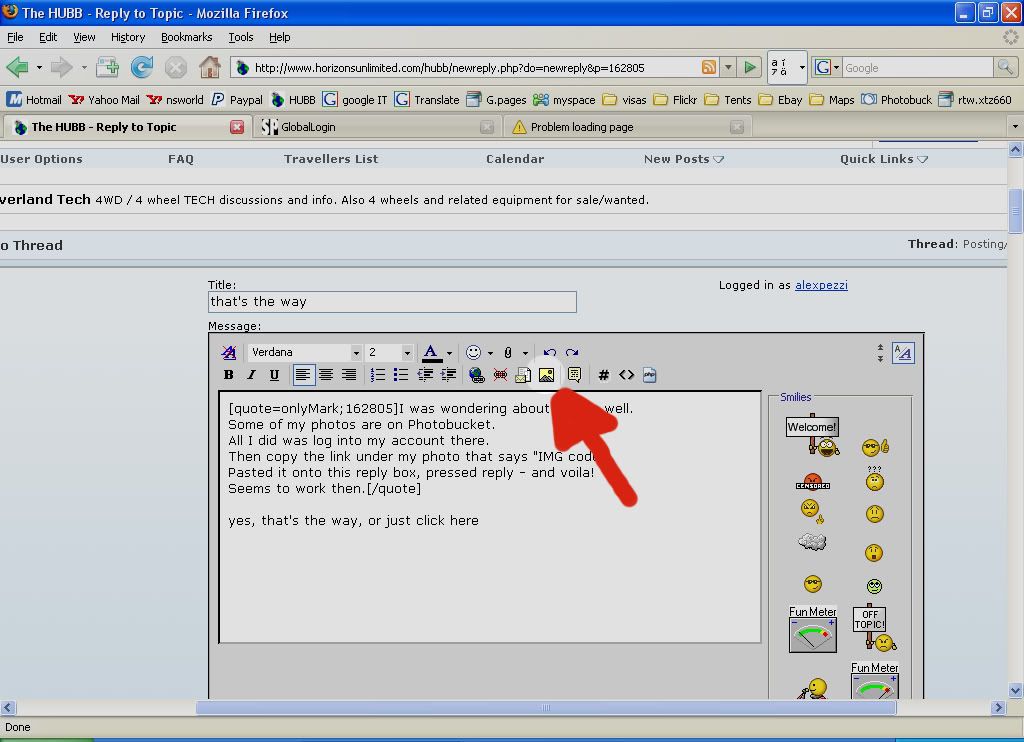
and when this pops up:
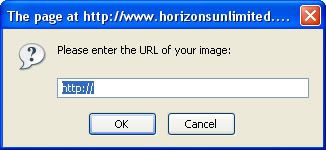
paste the URL (link) of your picture and press OK.
It should appear straight away otherwise you will have to click "Preview Post" for the pic to come up then you can carry on editing your post.
You can find the URL of almost any picture in the internet rigth-clicking on it and looking under "Properties", for example, I can "steal" the HUBB logo and publish it here:

many times..... 
hope this helps.
regards.
__________________
... and Nelly The Elephant packed the trunk and said goodbye to the circus...
|
|
Currently Active Users Viewing This Thread: 1 (0 Registered Users and/or Members and 1 guests)
|
|
|
 Posting Rules
|
You may not post new threads
You may not post replies
You may not post attachments
You may not edit your posts
HTML code is Off
|
|
|
|

Check the RAW segments; Grant, your HU host is on every month!
Episodes below to listen to while you, err, pretend to do something or other...

2020 Edition of Chris Scott's Adventure Motorcycling Handbook.
"Ultimate global guide for red-blooded bikers planning overseas exploration. Covers choice & preparation of best bike, shipping overseas, baggage design, riding techniques, travel health, visas, documentation, safety and useful addresses." Recommended. (Grant)

Ripcord Rescue Travel Insurance™ combines into a single integrated program the best evacuation and rescue with the premier travel insurance coverages designed for adventurers.
Led by special operations veterans, Stanford Medicine affiliated physicians, paramedics and other travel experts, Ripcord is perfect for adventure seekers, climbers, skiers, sports enthusiasts, hunters, international travelers, humanitarian efforts, expeditions and more.
Ripcord travel protection is now available for ALL nationalities, and travel is covered on motorcycles of all sizes!
What others say about HU...
"This site is the BIBLE for international bike travelers." Greg, Australia
"Thank you! The web site, The travels, The insight, The inspiration, Everything, just thanks." Colin, UK
"My friend and I are planning a trip from Singapore to England... We found (the HU) site invaluable as an aid to planning and have based a lot of our purchases (bikes, riding gear, etc.) on what we have learned from this site." Phil, Australia
"I for one always had an adventurous spirit, but you and Susan lit the fire for my trip and I'll be forever grateful for what you two do to inspire others to just do it." Brent, USA
"Your website is a mecca of valuable information and the (video) series is informative, entertaining, and inspiring!" Jennifer, Canada
"Your worldwide organisation and events are the Go To places to for all serious touring and aspiring touring bikers." Trevor, South Africa
"This is the answer to all my questions." Haydn, Australia
"Keep going the excellent work you are doing for Horizons Unlimited - I love it!" Thomas, Germany
Lots more comments here!

Diaries of a compulsive traveller
by Graham Field
Book, eBook, Audiobook
"A compelling, honest, inspiring and entertaining writing style with a built-in feel-good factor" Get them NOW from the authors' website and Amazon.com, Amazon.ca, Amazon.co.uk.
Back Road Map Books and Backroad GPS Maps for all of Canada - a must have!
New to Horizons Unlimited?
New to motorcycle travelling? New to the HU site? Confused? Too many options? It's really very simple - just 4 easy steps!
Horizons Unlimited was founded in 1997 by Grant and Susan Johnson following their journey around the world on a BMW R80G/S.
 Read more about Grant & Susan's story
Membership - help keep us going!
Horizons Unlimited is not a big multi-national company, just two people who love motorcycle travel and have grown what started as a hobby in 1997 into a full time job (usually 8-10 hours per day and 7 days a week) and a labour of love. To keep it going and a roof over our heads, we run events all over the world with the help of volunteers; we sell inspirational and informative DVDs; we have a few selected advertisers; and we make a small amount from memberships.
You don't have to be a Member to come to an HU meeting, access the website, or ask questions on the HUBB. What you get for your membership contribution is our sincere gratitude, good karma and knowing that you're helping to keep the motorcycle travel dream alive. Contributing Members and Gold Members do get additional features on the HUBB. Here's a list of all the Member benefits on the HUBB.
|
|
|










 Linear Mode


